Delivery process

Find out how to order the delivery of some (or all) of your stored items.

  1. Log in to your personal space
  2. Choose the items you want to retrieve
  3. Confirm your delivery order
  4. Validate your service

1️⃣ Log in to your personal space

Start by logging into your personal space with your login and password.

YouStock delivery process personal space connection

2️⃣ Choose the items you want to retrieve

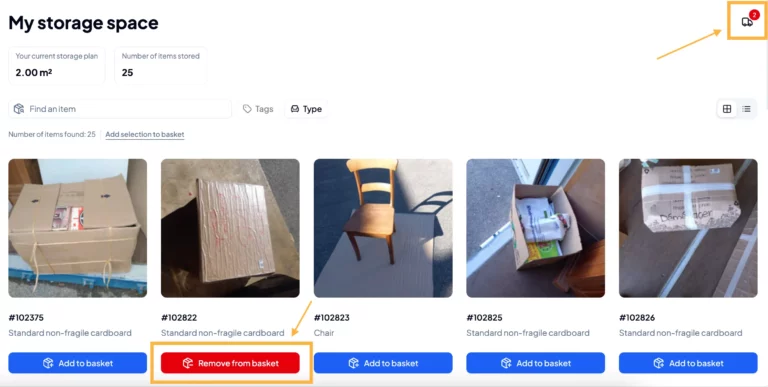
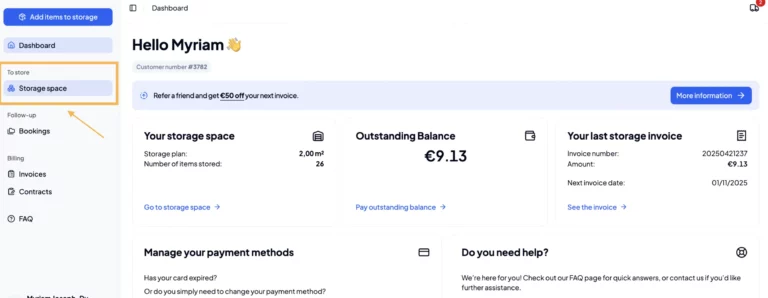
Now that you are logged into your personal space, click on the Inventory tab.

From this page, you will be able to see all of your stored goods and select the ones you wish to retrieve.

Delivery process choosing items to deliver
  • Option 1: To retrieve only a few items
    If you only want to retrieve a few of your stored items, you will need to click the Add to basket button on each item you want to retrieve.
  • Option 2: To retrieve all your stored items
    It’s easy! Simply click the Retrieve All button at the top of your inventory.
YouStock Delivery Process My Storage Space

3️⃣ Confirm your delivery order

Once you’ve selected all the items you wish to pick up, click the truck icon in the top right corner of your screen.

Here you’ll find all the items you selected earlier. If you’re happy with this list, you can finalize your delivery order by clicking Proceed to ckekout.

YouStock Order Delivery process Confirmation

You will then be redirected to a page where you can enter all the necessary information for your delivery, such as your address, on-site contact details, and the delivery date.

Please note that the exact delivery date will be confirmed when you confirm your order with one of our advisors.

Then confirm your request by clicking on Submit my booking request and allow our teams to receive your delivery request.

4️⃣ Validate your service

After receiving your estimate by e-mail, do not forget to validate it so that your service is well taken into account by our teams.

YouStock delivery process service validation

To validate it, click on Check my quote from your email then check the boxes corresponding to the insurance conditions and the general conditions of sale, click on Pay, and finally, enter your identifiers to confirm your payment method.

YouStock delivery process Booking conditions

✅ It’s official, your delivery order has been placed! Now all you have to do is wait for our team to come to your home to drop off your chosen items.

A question? A hesitation?

Discuss it directly with an expert and find the right solution for your storage needs.

We call you right back !

Talk to our storage experts team, we’ll get back to you within 24 hours.

On vous recontacte !